





Rohan Kasichhwa
If you have ever wondered how companies collect large amounts of public web data, test websites from different countries, or bypass aggressive anti-bot systems, chances are proxy servers are involved somewhere in the process.
In this article, we will explore what proxy servers are, understand their architecture, compare different proxy types, and then dive deep into residential proxies one of the most widely used proxy technologies today.
/*! elementor – v3.23.0 – 05-08-2024 */
.elementor-heading-title{padding:0;margin:0;line-height:1}.elementor-widget-heading .elementor-heading-title[class*=elementor-size-]>a{color:inherit;font-size:inherit;line-height:inherit}.elementor-widget-heading .elementor-heading-title.elementor-size-small{font-size:15px}.elementor-widget-heading .elementor-heading-title.elementor-size-medium{font-size:19px}.elementor-widget-heading .elementor-heading-title.elementor-size-large{font-size:29px}.elementor-widget-heading .elementor-heading-title.elementor-size-xl{font-size:39px}.elementor-widget-heading .elementor-heading-title.elementor-size-xxl{font-size:59px}
What is a Proxy Server?
A proxy server acts as an intermediary between a client device and the internet.
Normally, when you visit a website, your device sends requests directly to the target server. With a proxy server, your requests first go through the proxy, which then forwards them to the destination.
Think of it like ordering food at a restaurant.You do not walk directly into the kitchen and place your order. Instead, you communicate with the waiter, who takes your request to the kitchen and brings the response back to you.
/*! elementor – v3.23.0 – 05-08-2024 */
.elementor-widget-image{text-align:center}.elementor-widget-image a{display:inline-block}.elementor-widget-image a img[src$=”.svg”]{width:48px}.elementor-widget-image img{vertical-align:middle;display:inline-block} 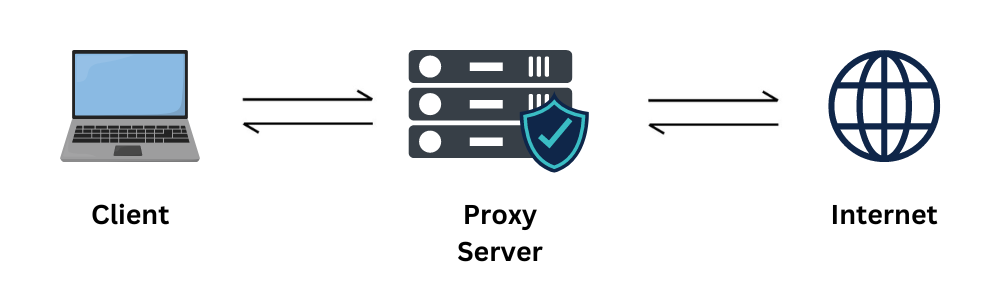
Understanding Proxy Architecture
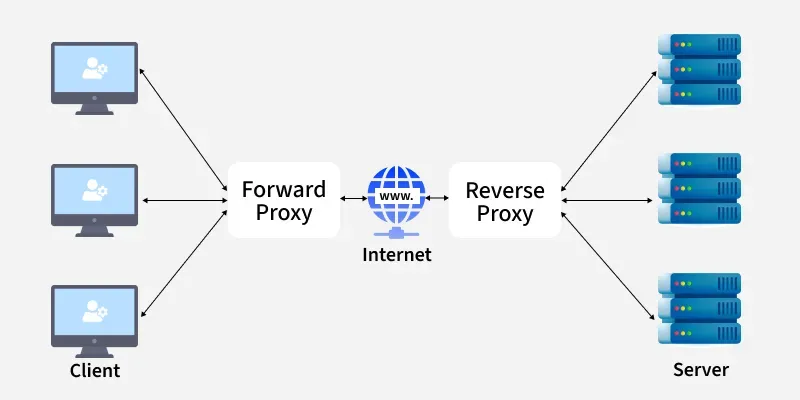
Proxies generally fall into two architectural categories depending on which side of the network they protect and optimize: Forward Proxies and Reverse Proxies.
Forward Proxies (Client Side)
A forward proxy sits in front of clients and controls outbound traffic to the public internet.
Think of it as the restaurant setup where the customer explicitly chooses what to order and uses the waiter to fetch data from any external entity.
Key Purposing & Core Capabilities:
- IP Masking: It completely hides the client’s internal IP address from destination servers, providing anonymity.
- Traffic Management: Aggregates and orchestrates requests coming from multiple clients through a single exit point.
- Content Filtering: Enables organizations or schools to block access to specific websites, unauthorized domains, or dangerous categories.
Common Forward Proxy Tools:
- Squid Proxy
- Apache Traffic Server
Reverse Proxies (Server Side)
A reverse proxy sits in front of a pool of backend servers and manages inbound traffic. Consider the analogy of arriving at a luxury hotel: you talk exclusively to the central reception desk. You do not get to pick your own room infrastructure directly; the reception dynamically determines which room to provide you based on availability and logic. Here, the reception acts as the proxy, and the hotel rooms function as the backend servers.
Key Purposing & Core Capabilities:
- Load Balancing: Distributes traffic evenly or intelligently across multiple server instances to guarantee high availability.
- Advanced Security: Mitigates distributed denial-of-service (DDoS) attacks by keeping backend source servers invisible to the public web.
- Performance Caching: Stores static server responses to reduce backend server CPU load and maximize content delivery speeds.
Common Reverse Proxy Tools:
- Nginx
- Cloudfare
/*! elementor – v3.23.0 – 05-08-2024 */
.elementor-widget-divider{–divider-border-style:none;–divider-border-width:1px;–divider-color:#0c0d0e;–divider-icon-size:20px;–divider-element-spacing:10px;–divider-pattern-height:24px;–divider-pattern-size:20px;–divider-pattern-url:none;–divider-pattern-repeat:repeat-x}.elementor-widget-divider .elementor-divider{display:flex}.elementor-widget-divider .elementor-divider__text{font-size:15px;line-height:1;max-width:95%}.elementor-widget-divider .elementor-divider__element{margin:0 var(–divider-element-spacing);flex-shrink:0}.elementor-widget-divider .elementor-icon{font-size:var(–divider-icon-size)}.elementor-widget-divider .elementor-divider-separator{display:flex;margin:0;direction:ltr}.elementor-widget-divider–view-line_icon .elementor-divider-separator,.elementor-widget-divider–view-line_text .elementor-divider-separator{align-items:center}.elementor-widget-divider–view-line_icon .elementor-divider-separator:after,.elementor-widget-divider–view-line_icon .elementor-divider-separator:before,.elementor-widget-divider–view-line_text .elementor-divider-separator:after,.elementor-widget-divider–view-line_text .elementor-divider-separator:before{display:block;content:””;border-block-end:0;flex-grow:1;border-block-start:var(–divider-border-width) var(–divider-border-style) var(–divider-color)}.elementor-widget-divider–element-align-left .elementor-divider .elementor-divider-separator>.elementor-divider__svg:first-of-type{flex-grow:0;flex-shrink:100}.elementor-widget-divider–element-align-left .elementor-divider-separator:before{content:none}.elementor-widget-divider–element-align-left .elementor-divider__element{margin-left:0}.elementor-widget-divider–element-align-right .elementor-divider .elementor-divider-separator>.elementor-divider__svg:last-of-type{flex-grow:0;flex-shrink:100}.elementor-widget-divider–element-align-right .elementor-divider-separator:after{content:none}.elementor-widget-divider–element-align-right .elementor-divider__element{margin-right:0}.elementor-widget-divider–element-align-start .elementor-divider .elementor-divider-separator>.elementor-divider__svg:first-of-type{flex-grow:0;flex-shrink:100}.elementor-widget-divider–element-align-start .elementor-divider-separator:before{content:none}.elementor-widget-divider–element-align-start .elementor-divider__element{margin-inline-start:0}.elementor-widget-divider–element-align-end .elementor-divider .elementor-divider-separator>.elementor-divider__svg:last-of-type{flex-grow:0;flex-shrink:100}.elementor-widget-divider–element-align-end .elementor-divider-separator:after{content:none}.elementor-widget-divider–element-align-end .elementor-divider__element{margin-inline-end:0}.elementor-widget-divider:not(.elementor-widget-divider–view-line_text):not(.elementor-widget-divider–view-line_icon) .elementor-divider-separator{border-block-start:var(–divider-border-width) var(–divider-border-style) var(–divider-color)}.elementor-widget-divider–separator-type-pattern{–divider-border-style:none}.elementor-widget-divider–separator-type-pattern.elementor-widget-divider–view-line .elementor-divider-separator,.elementor-widget-divider–separator-type-pattern:not(.elementor-widget-divider–view-line) .elementor-divider-separator:after,.elementor-widget-divider–separator-type-pattern:not(.elementor-widget-divider–view-line) .elementor-divider-separator:before,.elementor-widget-divider–separator-type-pattern:not([class*=elementor-widget-divider–view]) .elementor-divider-separator{width:100%;min-height:var(–divider-pattern-height);-webkit-mask-size:var(–divider-pattern-size) 100%;mask-size:var(–divider-pattern-size) 100%;-webkit-mask-repeat:var(–divider-pattern-repeat);mask-repeat:var(–divider-pattern-repeat);background-color:var(–divider-color);-webkit-mask-image:var(–divider-pattern-url);mask-image:var(–divider-pattern-url)}.elementor-widget-divider–no-spacing{–divider-pattern-size:auto}.elementor-widget-divider–bg-round{–divider-pattern-repeat:round}.rtl .elementor-widget-divider .elementor-divider__text{direction:rtl}.e-con-inner>.elementor-widget-divider,.e-con>.elementor-widget-divider{width:var(–container-widget-width,100%);–flex-grow:var(–container-widget-flex-grow)}
Proxy Servers vs VPNs
Many people confuse proxies and VPNs because both can hide IP addresses. However, they work differently.
A VPN encrypts your traffic and creates a secure tunnel for all network communication.
A proxy server primarily acts as an intermediary and often does not provide full traffic encryption
|
Basis of Comparison |
Proxy Server |
VPN (Virtual Private Network) |
|
Encryption |
The traffic flowing through standard proxies is not encrypted. |
It heavily encrypts data transmissions through secure protocols. |
|
Software Requirements |
Does not natively require an isolated client software stack. |
Typically relies on its own client app and specialized virtual OS drivers. |
|
Speed |
Significantly faster because it lacks cryptographic overhead. |
Slower compared to a proxy server due to structural encryption/decryption cycles. |
|
Cache System |
Actively utilizes local web cache stores to optimize latency. |
Does not make use of a centralized data caching layout. |
|
IP Address Visibility |
The client IP is hidden from the web, but the proxy owner can see it. |
The client IP address is hidden completely from end-to-end. |
Understanding IP Addresses
To understand residential proxies, we first need to understand IP addresses. An IP address is essentially a unique identifier assigned to devices connected to networks.
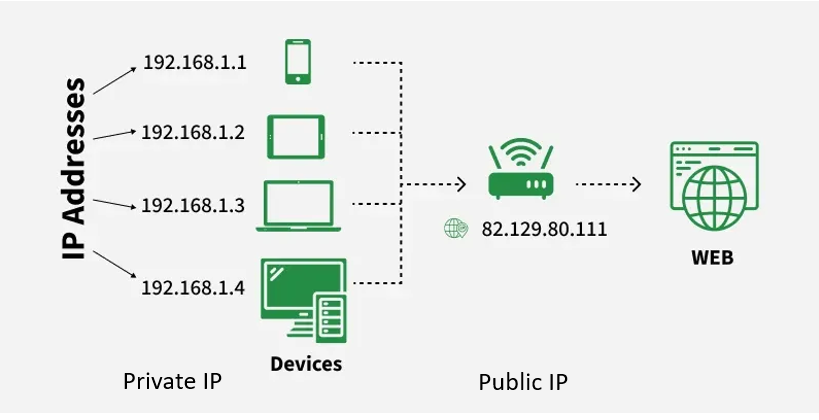
- Private IPs identify internal devices behind a home router.
- Public IP acts as a singular outward-facing node communicating with the broader web environment.
IP addressing exists in two mainstream versions across the internet:
- IPv4 Address Format: Composed of 4 octets (4 bytes = 32 bits, such as 185.107.80.231). Each byte evaluates from 0 to 255 in decimal or 8 binary bits. IPv4 is fundamentally capped at 4.3 billion unique combinations.
- IPv6 Address Format: Structured as a 128-bit hexadecimal identifier split into 16-bit segments (e.g., 2001:0DC8:E004:0001:0000:0000:0000:F00A). It is capable of hosting 340 undecillion unique addresses, scaling infinitely for future IoT demands.
Types of Proxy Servers
Before diving into residential proxies, it helps to understand the major categories available. To appreciate sophisticated automation, data collection, and anti-scraping evasion, it is helpful to contrast the three primary functional proxy types available in the marketplace
|
Proxy Type |
IP Source |
Trust Level |
Speed |
Typical Industry Use Cases |
|
Residential |
Real Home IPs |
High |
Moderate |
Web Scraping, Ad Verification, Market Audits |
|
Mobile |
Mobile Cellular IPs |
Very High |
Moderate |
App Testing, Localization, Geo-Targeting |
|
Datacenter |
Datacenter Hosting IPs |
Medium |
Fast |
High-Volume Market Research, Bulk Web Scraping |
In this blog we will dive deep only into Residential proxies.
What Are Residential Proxies?
A residential proxy routes internet traffic through the IP address of a real residential device connected to an ISP. This means websites see traffic coming from what appears to be a normal home user rather than a server or bot. Because of this, residential proxies are significantly harder to detect and block.
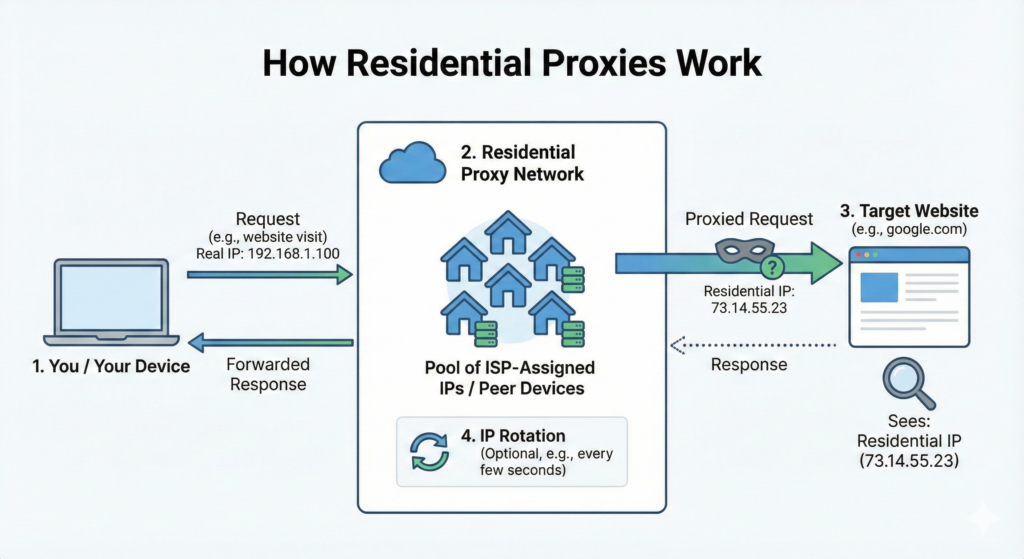
When an organization connects to a residential proxy network, it is assigned an authentic IP address belonging to a genuine residential device registered under an Internet Service Provider (ISP). Any ensuing web request is routed through that peer node. Because the target server identifies traffic source characteristics as an ordinary home user connection instead of an automated bot signature, it avoids triggering strict security blocks.
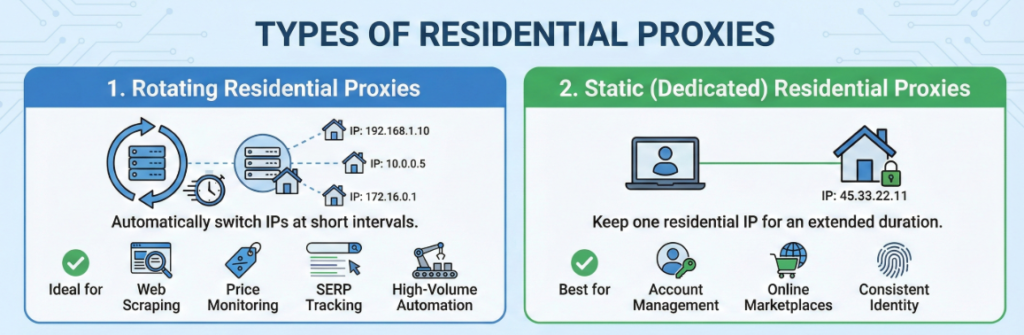
Types of Residential Proxy
These configurations are split into two core usage styles:
- Rotating Residential Proxies: Automatically switches IP endpoints at predefined intervals or with every unique request. This is ideal for continuous web scraping, real-time price monitoring, search engine results page (SERP) tracking, and high-volume automation tasks.
- Static Residential Proxies: Preserves a singular residential IP footprint for extended durations. This layout is preferred for account management, interacting with online marketplaces, and securing consistent digital identities.
How Companies Provide Proxy Service
In this blog, we will explore how companies provide residential proxies by looking at one of the top proxy service company: Bright Data

Bright Data (formerly Luminati Networks) is a global technology company that offers web data collection and proxy services. Bright Data’s Residential proxy network is one of core proxy solutions, offering access to 400M+ monthly residential IPs distributed across 195+ countries worldwide.
Steps to create residential proxy using Bright Data:
1. Sign in to Bright Dats
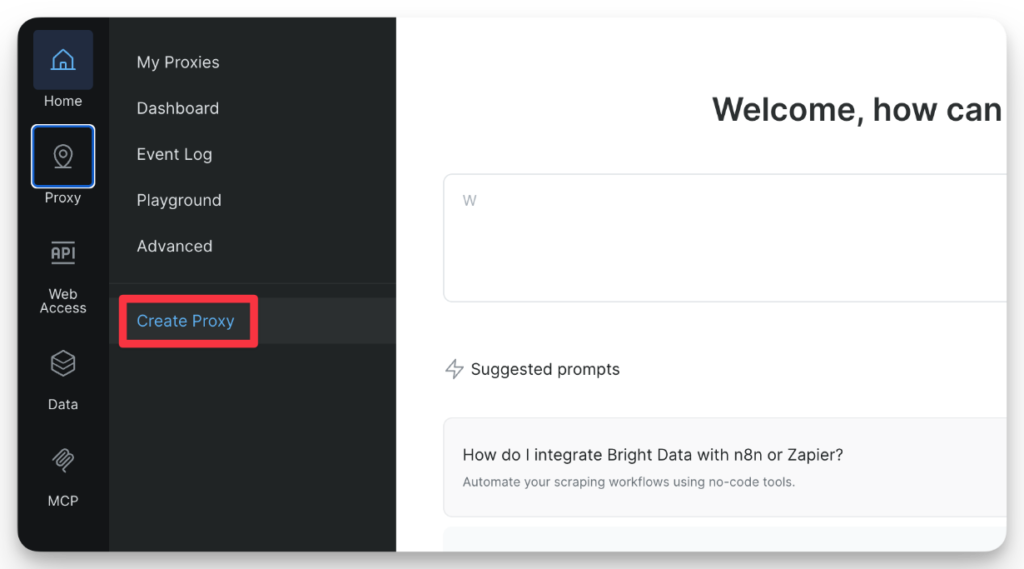
2. Open the Create Proxy Page
3. Choose Residential Proxy
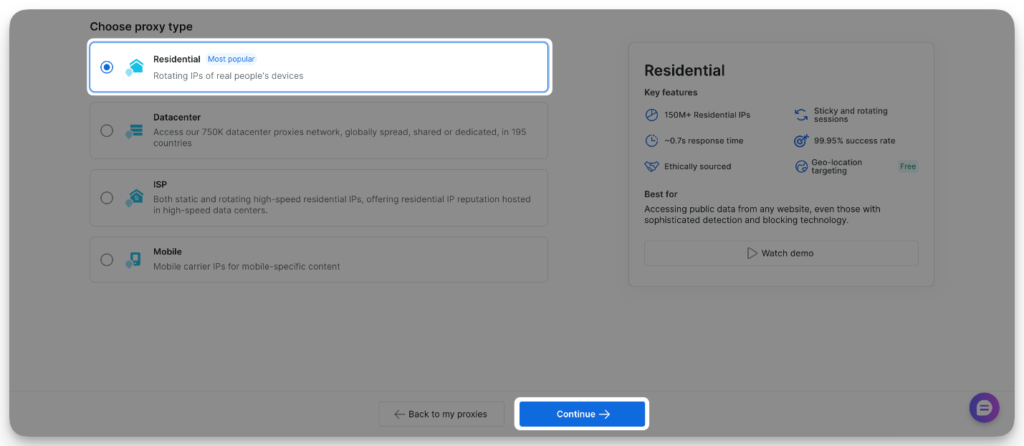
4. Assign a name to your proxy
Enter a meaningful name. Optionally, add a short description.
The proxy name cannot be changed once created. All other settings can be modified later.
5. Add payment method (free trial users only)
Click the button to open he payment verification form and complete the process. You will not be charged, this is for identity verification only.
6. Click Create Proxy
After the creation of the proxy we need to configure it.Start by going to the configuration tab of the proxy you want to configure.
7. Choose one of four Proxy types (IPs types) for your proxy zone:
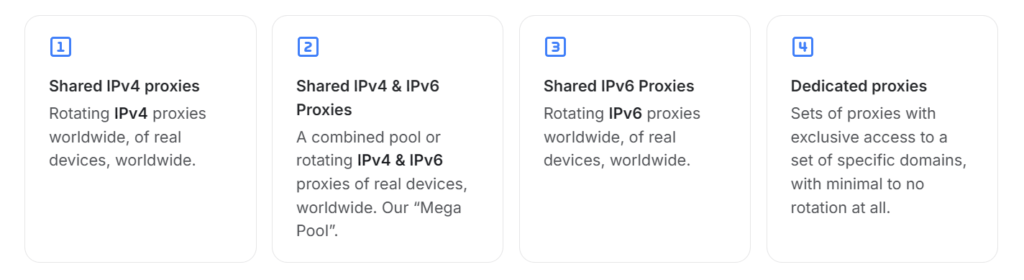
8. Configuring Residential shared proxies (Rotating proxies)
Most common setup is the Geolocation targeting allowing you to route your requests via proxies in specified location. You can select a default location – which will route all requests thru specific locations via our control panel.
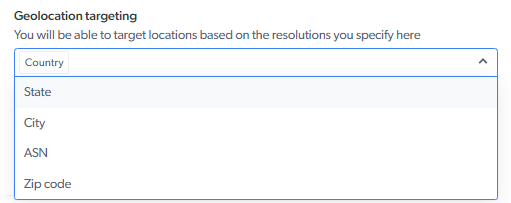
9. Configure Rotation Behavior
It means when should IP change.
- Option A: Automatic Rotation (Default): New residential IP every request.
- Option B: Sticky Session: Sticky = 10 min, Keep same IP for 10 min
Send your first proxy request
Now it’s time to send your first residential proxy request. You can Send your first request through Bright Data Residential proxies with copy-paste code examples in cURL, Python, Node.js, Java, and Go.
To get started, you need your proxy credentials, your Username and Password along with the Host name. You can find these credentials in the Overview tab of the proxy product
🐍
filename.py
1
2
3
4
5
6
7
8
9
10
11
12
13
14
15
16
17
import pprint
import requests
host = 'brd.superproxy.io'
port = 33335
username = 'brd-customer--zone-'
password = ''
proxy_url = f'http://{username}:{password}@{host}:{port}'
proxies = {
    'http': proxy_url,
    'https': proxy_url
}
url = "http://brdtest.com/myip.json"
response = requests.get(url, proxies=proxies)
pprint.pprint(response.json())
The code above uses the residential proxy to send a request tohttp://brdtest.com/myip.json. It returns your IP information in a JSON format:
					{
  "ip": "ALLOCATED_IP",
  "country": "NP",
  "asn": {
    "asnum": 203020,
    "org_name": "HostRoyale Technologies Pvt Ltd"
  },
  "geo": {
    "city": "Kathmandu",
    "region": "IS",
    "region_name": "Kathmandu",
    "postal_code": "44600",
    "latitude": 27.7007,
    "longitude": 85.3001,
    "tz": "Asia/Kathmandu",
    "lum_city": "Kathmandu",
    "lum_region": "is"
  }
}
Now, replace “https://brdtest.com/myip.json” with the website of your choice and …
That’s it!
Where Do Residential IPs Actually Come From?
You might be wondering: where do these residential IP addresses come from?
According to Bright Data’s documentation, their residential proxy network is based on an ethical and compliant opt-in model.
Participants in the network:
- Are clearly informed about how their IP addresses will be used
- Provide explicit consent through approved applications
- Are compensated for contributing their bandwidth
There are several common ways residential proxy networks are built:
1. App Installations
Some mobile or desktop apps include proxy-related software components. When users install these apps and agree to the terms and conditions, their devices may become part of the residential proxy network.
2. Partner Applications
Some third-party applications integrate proxy SDKs provided by proxy companies.
If users consent, these apps can use a portion of their internet connection as part of the network.
3. ISP Partnerships
Some companies work directly with Internet Service Providers (ISPs) to obtain residential IP addresses.
These usually create two types of networks:
- Dynamic Residential Proxies: These use real user devices connected through home internet connections. Requests are routed through actual residential devices, making the traffic appear like normal browsing activity.
- Static Residential / ISP Proxies: These use residential IP addresses provided directly by ISPs but host them on high-speed servers. This provides the trust of residential IPs with better performance and reliability.